PipelineX
One place to store your business knowledge, connect your tools, generate proposals, and ask questions — in plain English.
No tech background required. If you can send an email, you can use PipelineX.
What Comes With PipelineX
Every deployment includes these six core capabilities. No extra cost.
Knowledge Base
Upload your SOPs, contracts, price sheets, and playbooks. PipelineX reads them and makes them searchable.
HubSpot Integration
Connect your HubSpot CRM (or your existing CRM). Contacts, deals, and activity flow in automatically.
Proposal Generator
Turn a client conversation into a formatted proposal in minutes — not hours.
Email Templates
Pre-built follow-up and outreach emails that match your voice. Edit before you send. Always.
Your Choice of AI
Runs on Ollama (local, private) out of the box. Connect to OpenAI, Claude, or Gemini if you prefer.
Plain English Queries
Ask it anything about your business. It only answers from your actual documents — no made-up answers.
See It In Action
Click a prompt below to see a real response from PipelineX. These are actual outputs — not marketing copy.
Click a prompt to see PipelineX respond:
Try the Live Version
Want to use Pipeline Penny for real? Create a free account here.
You'll create a username and password. Access is reviewed by the owner — approval typically takes up to 30 minutes.
While you wait, browse free resources:
Both links require a free account. The resource library is available immediately after sign-up.
PipelineX Product Views
A quick look at the tabbed workspace style from the PipelineX template.
Command Post View
Central workspace for decisions, execution updates, and high-priority tasks.
- +Single screen to track what needs attention now
- +Natural-language workflow for fast updates
- +Designed for daily operational rhythm
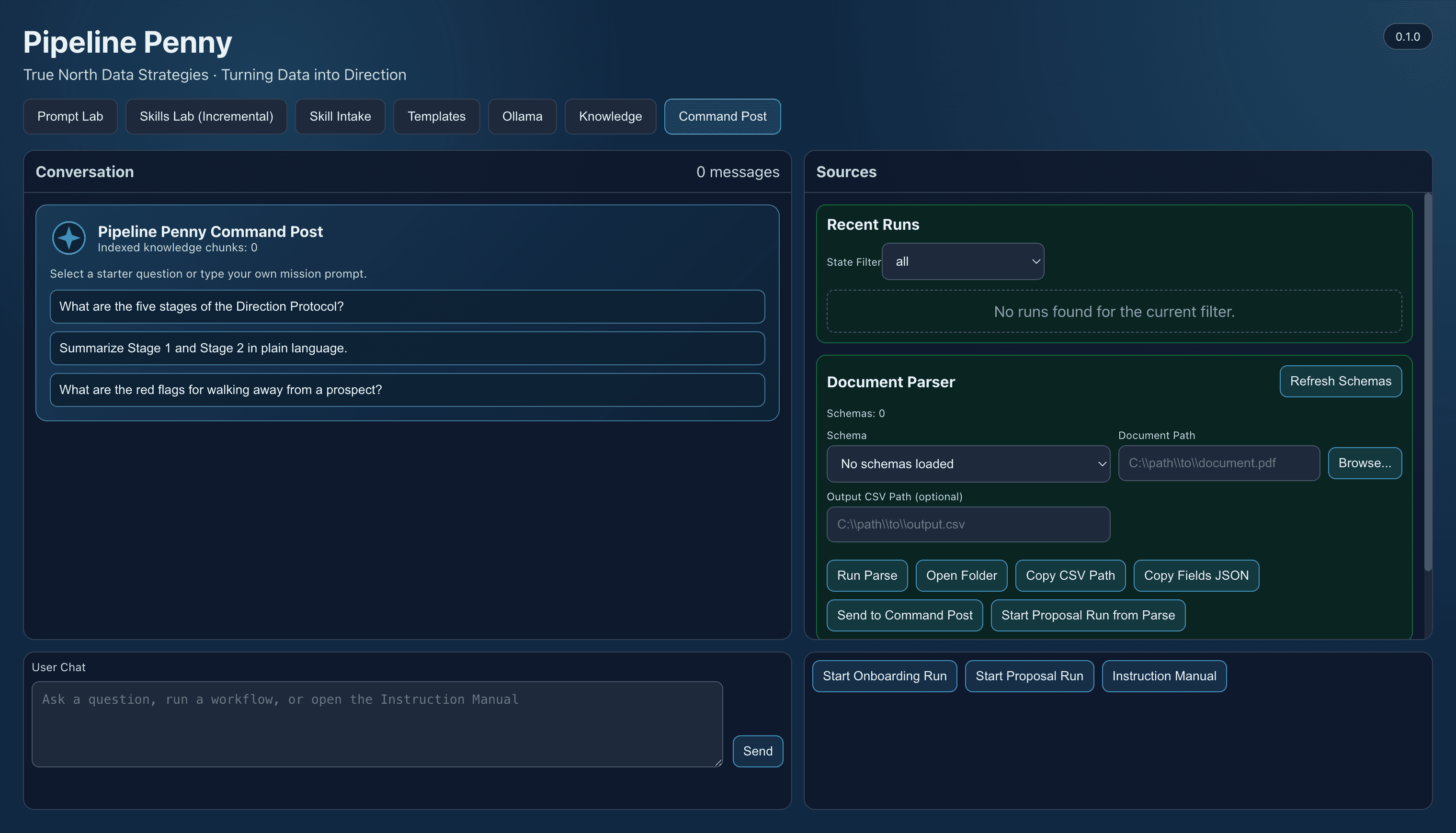
Real PipelineX UI capture from the current template workspace.
Add-On Modules
Once PipelineX is live, you can add capabilities as your needs grow. Each module is scoped and priced separately — you only pay for what you actually need.
Financial dashboard — see revenue, expenses, and margins at a glance
Fleet & asset tracking — know where your equipment is and when it was last serviced
Client onboarding automation — new clients trigger a workflow, not a to-do list
SMS alerts — get a text when something needs your attention
Google Workspace integration — Docs, Sheets, Gmail, Calendar all connected
Government contracting module — tracks compliance, deadlines, and deliverables
Custom prompts and skills — trained on your specific business processes
Not sure what you need? That's what the first call is for. We figure it out together.
How the AI Part Works — In Plain English
PipelineX uses AI the same way a calculator uses math. It's a tool that processes information fast. You give it your documents and data. It learns them. When you ask a question, it looks through what you gave it and returns an answer — not a guess.
If it doesn't have the information (like in the demo screenshot above), it tells you that. It doesn't make things up. That's by design.
Your data stays private. Runs locally on Ollama by default. If you connect to OpenAI, Claude, or Gemini, that's your choice — and you control what gets sent where.
Bottom line: AI does the searching. Your people still do the deciding.
Ready to Get Started?
Every PipelineX deployment starts with a conversation. We scope it together, price it upfront, and build it. Fixed scope. Fixed price. You own everything when we're done.